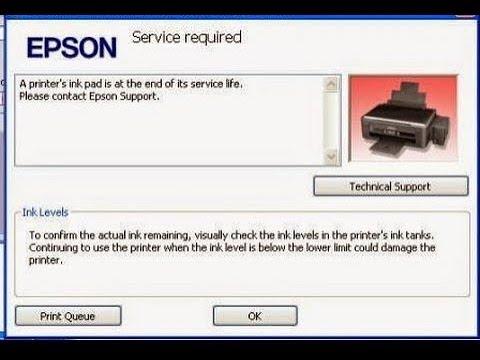
Staring at flashing red lights and a stubborn error message that says “Ink pad at the end of its service life” or “Service Required”?
If your Epson printer has suddenly locked up and refused to print, don’t rush to throw it away or pay costly technician fees. In most cases, your printer isn’t actually broken—its internal “paranoid accountant” (the waste ink counter) has just hit its preset limit.
At Mwash Cyber, we provide fast, 100% working solutions to bring your printer back to life in minutes!
Table of Contents
Why Does This Happen?
Every time your Epson printer cleans its printheads or boots up, it flushes excess ink into internal waste pads. The printer tracks this usage digitally. Once the software counter reaches its maximum limit, it locks the system down to prevent overflowing—even if your physical pads still have plenty of life left.
Your Two Easy Ways Out with Mwash Cyber:
Option 1: Do It Yourself – Download the Adjustment Program (AdjProg)
If you prefer handling it yourself, we host a wide library of tested, working Epson Adjustment Programs (Resetters) for popular models like the L3110, L3250, L3251, L1210, L3210, L805, and many more.
- Get your tool: Visit our digital shop at shop.mwashcyber.co.ke
- Connect via USB: Plug your printer into a Windows PC using a USB cable (Wi-Fi resets can be unreliable).
- Run the Reset: Open
AdjProg.exe, go to Particular Adjustment Mode, select Waste Ink Pad Counter, check the main pad box, and click Initialize. - Restart your printer, and you’re back in business!
Option 2: Let Us Do It For You Remotely (KSh 300)
Don’t want to stress over software keys, antivirus pop-ups, or finding the right file version? Let our technicians handle it remotely via AnyDesk right from your home or office!
- Cost: Only KSh 300
- No machine transport required—stay right where you are.
Get Help Now
- 🛒 Browse Resetter Tools: shop.mwashcyber.co.ke
- 📲 Chat us on WhatsApp for Instant Remote Assistance: 0707637143
- 💻 Read the Full Step-by-Step Guide: Mwash Cyber Blog
About The Author

Leave a Reply
You must be logged in to post a comment.