


There’s a common misconception that using AI to write a CV somehow “cheats” the process or produces a generic, soulless document that recruiters will instantly spot and toss aside. The truth is, AI doesn’t replace your input or personality—it amplifies them. When used correctly, AI acts like a skilled editor and strategist, helping you craft a polished, professional CV that highlights your strengths and aligns with what employers are looking for. It’s not about letting a machine do all the work; it’s about leveraging a tool to work smarter.
Table of Contents
Why Using AI Can Help
AI offers a few game-changing advantages when it comes to CV writing. First, it saves time. Sorting through your experiences, figuring out how to phrase them, and formatting everything can take hours—or even days. AI can churn out a solid draft in minutes, leaving you more time to refine it. Second, it’s great at spotting patterns and optimizing language. Models like ChatGPT or Grok are trained on vast amounts of text, including job descriptions and successful CVs, so they can suggest wording that’s professional, concise, and tailored to your industry. Finally, AI eliminates the blank-page panic. If you’ve ever stared at a cursor wondering where to start, AI gives you a foundation to build from, reducing stress and boosting confidence.
Step-by-Step Guide to Writing a CV with AI
Here’s how to use an AI model like ChatGPT to create a CV that stands out. Follow these steps, and you’ll have a professional document ready to impress.
Step 1: Gather Your Information
Before you ask AI for help, collect all the raw material it needs to work with. This includes:
- Your full name and contact details (email, phone, LinkedIn if applicable).
- Work experience: job titles, companies, dates (month/year), and key responsibilities or achievements.
- Education: degrees, institutions, and graduation years.
- Skills: both hard skills (e.g., Python, project management) and soft skills (e.g., teamwork, communication).
- Certifications, awards, or volunteer work (if relevant).
- The job or industry you’re targeting (so the AI can tailor the tone and keywords).
The more specific you are, the better the output. AI can’t guess details you don’t provide!
Step 2: Use a Clear, Detailed Prompt
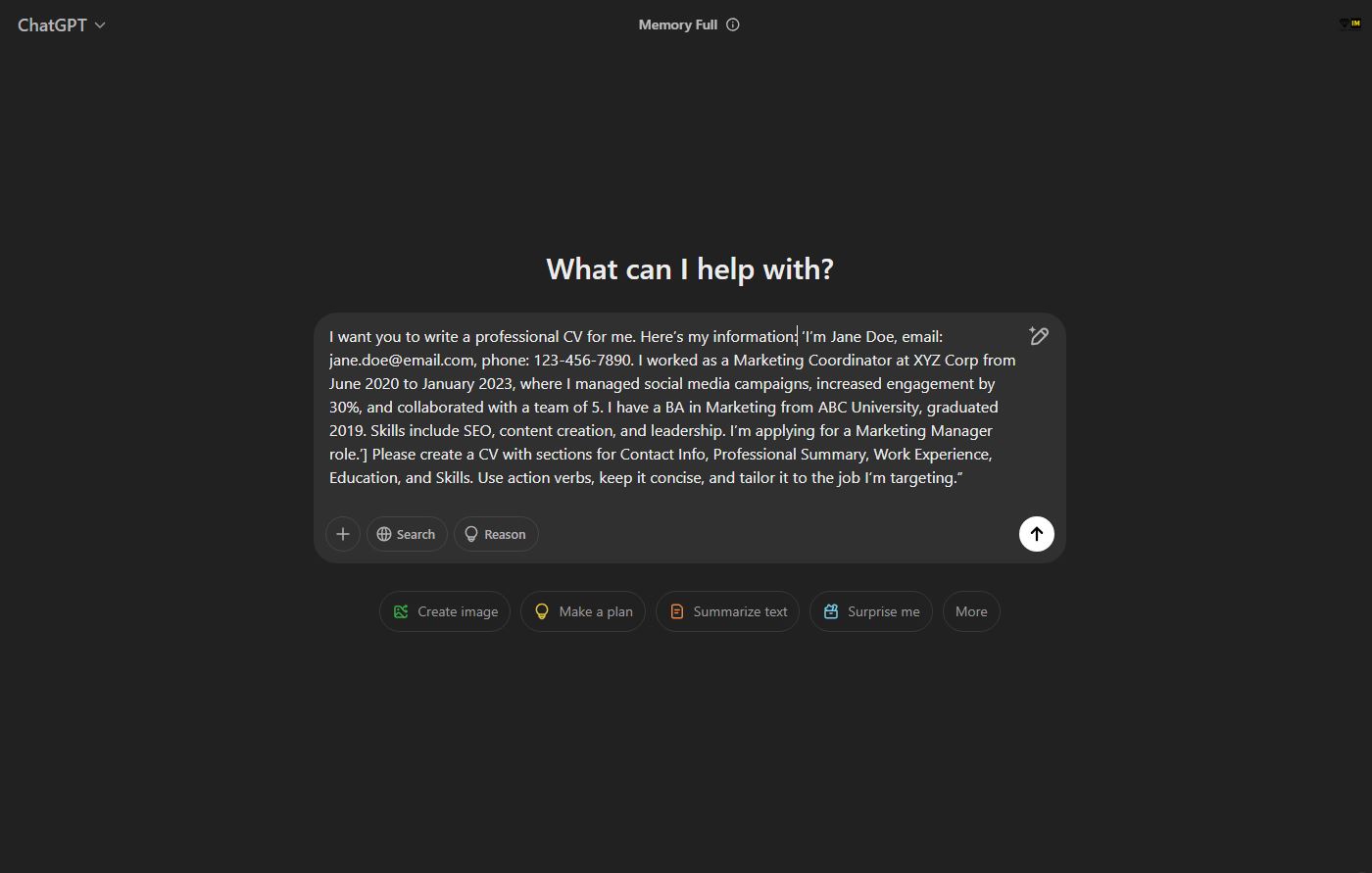
AI thrives on good instructions. Here’s a sample prompt you can use—feel free to tweak it based on your needs:
Prompt:
“I want you to write a professional CV for me. Here’s my information: [Insert your details—e.g., ‘I’m Jane Doe, email: [email protected], phone: 123-456-7890. I worked as a Marketing Coordinator at XYZ Corp from June 2020 to January 2023, where I managed social media campaigns, increased engagement by 30%, and collaborated with a team of 5. I have a BA in Marketing from ABC University, graduated 2019. Skills include SEO, content creation, and leadership. I’m applying for a Marketing Manager role.’] Please create a CV with sections for Contact Info, Professional Summary, Work Experience, Education, and Skills. Use action verbs, keep it concise, and tailor it to the job I’m targeting.”
Paste this into your AI tool of choice, replacing the bracketed part with your own details. The more you give, the less generic the result will be.
Step 3: Review the Output
Once the AI generates your CV, read it carefully. It might look something like this (based on the prompt above):
Jane Doe
[email protected] (mailto:[email protected]) | 123-456-7890 | linkedin.com/in/janedoe
Professional Summary
Dynamic marketing professional with over two years of experience driving successful campaigns and boosting engagement. Skilled in SEO, content creation, and team collaboration, seeking to leverage expertise as a Marketing Manager.
Work Experience
Marketing Coordinator
XYZ Corp, June 2020 – January 2023
- Managed social media campaigns, increasing engagement by 30% within one year.
- Collaborated with a team of 5 to develop and execute marketing strategies.
- Optimized content using SEO best practices to enhance online visibility.
Education
Bachelor of Arts in Marketing
ABC University, Graduated May 2019
Skills
- SEO & Analytics
- Content Creation
- Team Leadership & Collaboration
This is a strong start, but it’s not perfect yet—AI drafts rarely are.
Step 4: Edit and Personalize
AI might nail the structure, but you need to make it yours. Here’s how to polish it:
- Add Personality: If the summary feels stiff, inject some of your voice. Change “Dynamic marketing professional” to “Creative marketer with a passion for storytelling” if that suits you.
- Quantify More: AI might miss specifics. If you led a project that saved $10K or grew a follower base by 5,000, add those numbers.
- Tweak for the Job: Cross-check the CV against the job description. If it emphasizes “budget management” and you’ve done that, make sure it’s prominent.
- Fix Errors: AI can slip up—double-check dates, company names, and grammar.
- Format It: AI often outputs plain text. Paste it into a CV template (like in Word or Google Docs) and adjust fonts, spacing, and headings for a sleek look.
Step 5: Iterate if Needed
Not happy with the first draft? Ask the AI to refine it. Try: “Rewrite the Professional Summary to sound more confident” or “Add a bullet point about my volunteer work organizing a charity event.” You can keep tweaking until it feels right.
Step 6: Final Proofread
Before sending it out, proofread it yourself or ask a friend to. AI can miss subtle tone issues or overused phrases that might not land with a human reader.
Pro Tips for Success
- Be Specific in Your Prompt: Vague inputs lead to vague outputs. Mention your industry, target role, and any standout achievements.
- Ask for Variations: If you’re unsure about tone, ask the AI for two versions—e.g., one formal, one creative.
- Use Keywords: If you have a job description, feed key phrases to the AI to sprinkle in.
- Keep It Human: Employers want to see your story, not a robot’s. Use AI as a co-writer, not the sole author.
Wrapping Up
Using AI to write your CV isn’t about cutting corners—it’s about working efficiently and strategically. Tools like Grok or ChatGPT can help you organize your thoughts, find the right words, and present your best self, all while saving you time. Give it a shot: gather your details, use the prompt above, and watch a rough draft come to life. With a bit of editing, you’ll have a CV that’s not just good, but you—polished to perfection. Ready to get started?
Mwash Cyber is an online serving cyber café based in Nairobi
- Mwash Cyber

- Mwash Cyber

- Mwash Cyber

- Mwash Cyber




